
Screenshots


App details
- Updated
- September 25, 2010
- Requires
- Windows 2003, Windows Vista, Windows, Wi...
- Developer
- Returnil
- Category
- Mobile
SoftPas in:
This product is also available in the following languages:
About Returnil System Safe Free 2011
Download Returnil System Safe Free 2011 – Security Suite, Virus Protection, Malware Protection, Virtual Mode, Free Antivirus, Virtualization Tool, PC Protection, System Safe, Safe Browsing
Overview
Returnil System Safe Free 2011 is a security suite designed for Windows systems, offering foundational protection against viruses and malware. The app serves as a lightweight, free tool for users seeking to safeguard their PCs from digital threats without investing in premium software. It addresses common concerns such as unauthorized system changes, malicious downloads, and online browsing risks. The target audience includes home users, students, and individuals who prioritize system stability and security on budget or low-resource devices. While the developer, Returnil, is known for its virtualization-based security solutions, the company did not provide additional technical background or modern development updates. The app functions as a preventive tool, particularly useful in environments where system integrity is critical, such as public computers or shared workstations. Its real-world use cases include safe internet browsing, temporary software testing, and minimizing the risk of persistent malware infections. Despite its age, the app remains relevant in niche scenarios where a simple, non-intrusive security layer is needed. It occupies a unique space in the PC security ecosystem by combining antivirus functionality with virtualization, a feature that was relatively uncommon at the time of its release.Key Features & Functionality
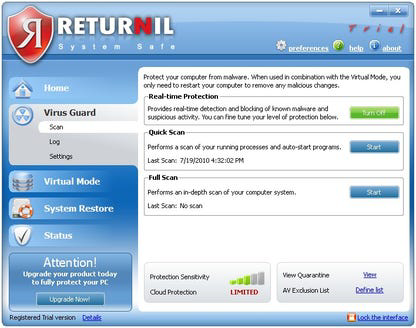
The app offers a set of core functionalities tailored to basic system protection and secure computing.- Virus and Malware Protection: The software performs real-time scanning to detect and block known threats, helping maintain system integrity. It runs background checks and alerts users when suspicious activity is detected.
- Virtual Mode: This feature creates a temporary, isolated environment for browsing and software use. Any changes made during this session are discarded upon reboot, preventing persistent infections or system alterations.
- Thorough System Scanning: Users can initiate full system scans via a simple interface. The scan checks for malware, suspicious files, and system anomalies, with results displayed clearly after completion.
- Easy Installation and Access: The setup process requires a system reboot to complete. Once installed, the app runs in the background with minimal interference, accessible through a system-tray icon and an optional floating desktop bar.
- Virtualization Made Easy: The app simplifies virtualization, a complex task for average users, by enabling a virtual environment with minimal performance impact.
Interface, UX & Performance
The user interface of Returnil System Safe Free 2011 is designed with simplicity and accessibility in mind. It uses large fonts and a familiar layout, making it approachable for users with limited technical experience. Navigation is straightforward, relying on a system-tray icon and a floating desktop bar for quick access to key functions. The main dashboard presents essential tools—such as scan initiation and Virtual Mode activation—in a clean, uncluttered manner. Although the developer did not list formal performance metrics, the app is reported to have minimal impact on system resources during operation. It runs efficiently in the background, allowing users to continue regular tasks without noticeable slowdowns. Responsiveness is consistent across various Windows hardware configurations, though specific compatibility details were not disclosed. Stability appears reliable based on the app’s long-standing presence in the market, though no recent updates have been released. The absence of modern UI elements like dark mode or touch optimization reflects its age. Overall, the UX prioritizes functionality over aesthetics, focusing on ease of use and system transparency.Platform Compatibility & Technical Requirements
Returnil System Safe Free 2011 is designed for the Windows platform. The software version is 2011, with a file size of 20.5 MB. The developer did not specify minimum OS requirements or compatibility with modern Windows versions such as Windows 10 or 11. As such, it may not function properly on newer systems without compatibility mode or additional configuration. The app was released on March 21, 2011, and has not been updated since. Users should exercise caution when installing on current systems, as outdated security software may lack protection against modern threats. The absence of recent updates raises concerns about long-term viability and support. While the app may still run on older Windows versions like XP or 7, compatibility with current hardware and software environments cannot be guaranteed.Pros and Cons
- Provides basic virus and malware protection at no cost
- Virtual Mode enables safe browsing and temporary software testing
- Simple interface with large fonts and intuitive layout
- Minimal system resource usage during operation
- Easy installation requiring only a single reboot
- Outdated software with no updates since 2011
- Missing advanced features like automatic rollback and remote management
- File Manager disabled in Virtual Mode, limiting usability
- Compatibility with modern Windows versions is uncertain
- Lacks real-time threat intelligence and cloud-based detection
FAQ
Is Returnil System Safe Free 2011 safe to install?
Yes, the software is safe to install as long as it is downloaded from a trusted source. However, due to its age, it may not protect against current malware variants.Can I use Virtual Mode to save files?
No, the free version disables the File Manager in Virtual Mode, so any files created during a session are lost after reboot.Does the app support Windows 10 or 11?
The developer did not specify compatibility with Windows 10 or 11. It may run in compatibility mode, but performance and security cannot be guaranteed.Is Returnil System Safe Free 2011 free to use?
Yes, the app is available at no cost, though it lacks premium features found in the paid version.How often should I run a system scan?
It is recommended to run a scan periodically, especially after browsing unfamiliar websites or downloading new software.Final Thoughts
Returnil System Safe Free 2011 remains a historically notable tool in the realm of PC security, combining basic antivirus protection with a unique virtualization feature. While its age and lack of updates limit its effectiveness against modern threats, it still offers value in specific use cases—such as securing public or shared computers, testing software in isolation, or providing a lightweight safety net. The app’s simplicity, low resource usage, and straightforward interface make it accessible to less tech-savvy users. However, for current protection needs, it should not be relied upon as a primary security solution. Its legacy lies in pioneering the concept of virtualized system protection, a feature now common in modern tools. For those seeking a free, no-frills security layer with virtualization capabilities, Returnil System Safe Free 2011 may still serve a purpose—but only with full awareness of its limitations. Download Returnil System Safe Free 2011 now.Guides & Tutorials
How to install Returnil System Safe Free 2011
- Click the Download button above.
- Once redirected, accept the terms and click Install.
- Wait for the Returnil System Safe Free 2011 download to finish on your device.
How to use Returnil System Safe Free 2011
This software is primarily used for its core features described above. Open the app after installation to explore its capabilities.
User Reviews
No reviews yet. Be the first to share your experience.
You may also like
more
Que no te pillen¡
About !Que no te pillen¡Reviewed by Jason A. BilbreyShow MoreShow Less

3D Combat Zone
About 3D Combat ZoneOriginally released in 1983, 3D Combat Zone immerses players...

666: El día del portal
About 666: El día del portalOn June 6, 2006, Agent P. Stone uncovers a sinister...

80 in 1 Best Flash games
About 80 in 1 Best Flash games 80 in 1 Best Flash games is a collection of 80 fl...

ABYSS SEEKERーーWhat Do You See Deep in The Abyss
About ABYSS SEEKERーーWhat Do You See Deep in The AbyssIn ABYSS SEEKER, players...

ACA NEOGEO THE KING OF FIGHTERS 2002 for Windows
About ACA NEOGEO THE KING OF FIGHTERS 2002 for WindowsTHE KING OF FIGHTERS 2002,...